How to Build a Private, Scalable LLM Infrastructure
In the rush to adopt generative AI, most enterprises took the path of least resistance: API calls to providers like OpenAI or Anthropic. That was the right move for prototyping, but as AI applications move into production, the “API-first” honeymoon is starting to fade.
Concerns about data privacy, vendor lock-in, and unpredictable costs are forcing engineering teams to rethink their strategy. The old assumption that high-performance AI requires dependence on third-party black boxes no longer holds. With the rise of high-quality open-weights models such as Llama 3, Mistral, Qwen, and specialized vision-language models, teams now have credible alternatives.
The biggest remaining obstacle is infrastructure. Managing Kubernetes clusters, provisioning NVIDIA GPUs, and tuning inference engines is a full-time job that many product teams cannot justify. That is where serverless GPUs become compelling. By using Modal, we can move beyond managed APIs toward an architecture that offers much of the flexibility of private model serving with the elasticity of the cloud.
The Technical Core: Orchestrating Privacy at Scale
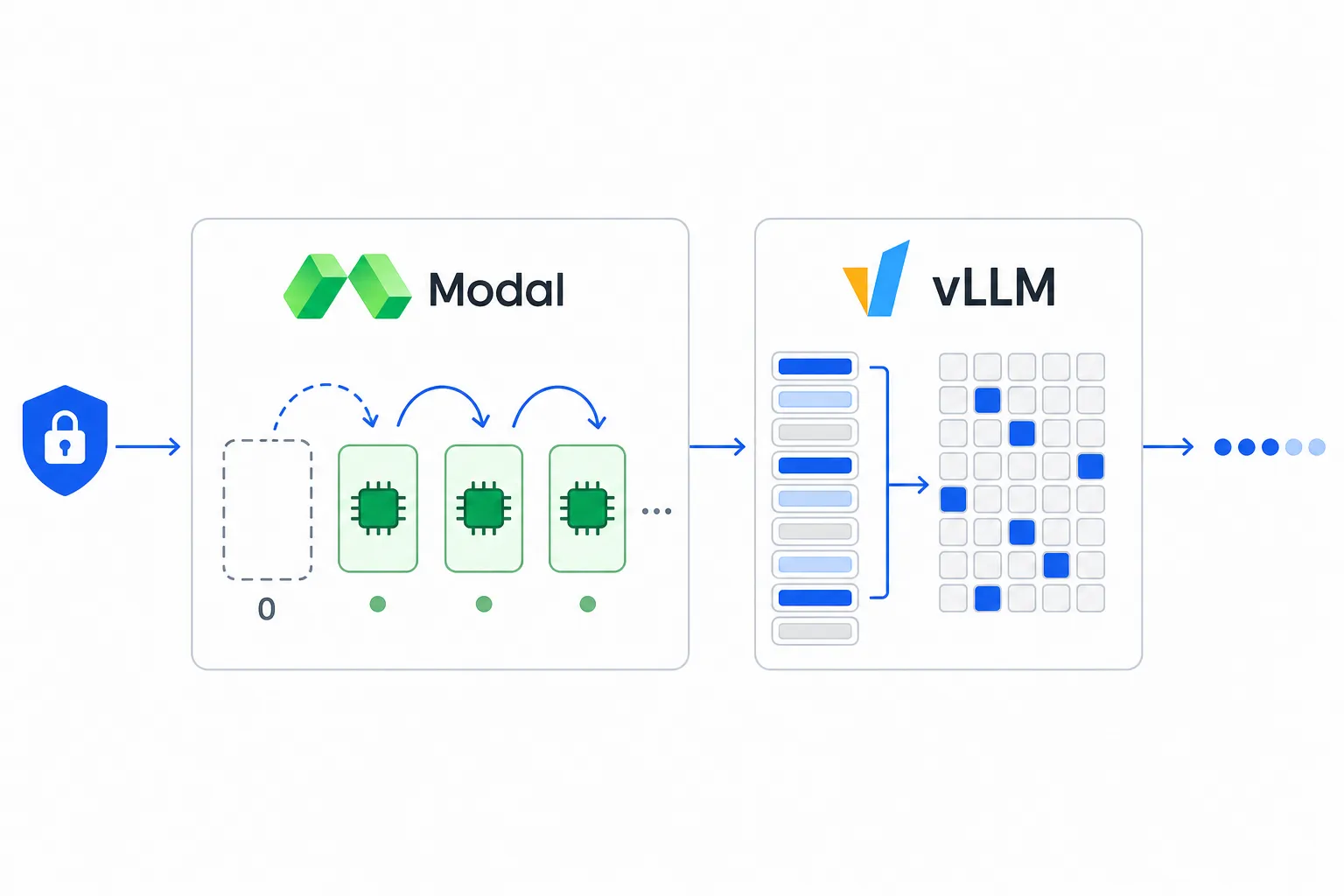
Adopting open-weights models is the foundation of a more private AI strategy, but the harder problem is making them fast and secure without building a full platform team. Pairing vLLM with Modal’s serverless orchestration gives you much of the convenience of a managed API while preserving far more control over how data is handled.
-
Infrastructure as Code (IaC)
Traditionally, deploying an LLM meant managing Dockerfiles, Kubernetes manifests, and NVIDIA driver compatibility. Modal compresses much of that complexity into a Python-native definition. Your infrastructure can live alongside your application code, with CUDA versions, system libraries, and Python dependencies specified directly in the script. When you deploy, Modal builds the container and schedules it onto its GPU fleet.
-
The Engine: vLLM
Serving a model is not just about loading weights into VRAM; it is about maximizing throughput. We use vLLM as the inference engine for two main reasons:
- PagedAttention: Much like virtual memory in an operating system, it manages the KV cache efficiently, reducing memory waste and allowing for larger effective batch sizes.
- Continuous Batching: It does not wait for an entire batch to finish. Instead, it injects new requests as capacity opens up, which reduces latency under load.
-
Solving the Cold Start: Modal Volumes
One of the main challenges with serverless LLMs is the time it takes to pull large models from remote hubs. Modal Volumes reduce that penalty by acting as a persistent cache. With a Volume mounted, model weights stay close to the runtime, so containers can move from “cold” to active inference much faster.
This is what makes scale-to-zero practical. Containers can hibernate during periods of inactivity, which avoids paying for idle GPU time. When a new request arrives, Modal can provision a new container on demand, preserving elasticity without requiring a 24/7 cluster.
-
Pushing Cold Starts Lower: Memory Snapshots
For real-world deployments, Volumes are often only the first step. Modal’s memory snapshots push startup time lower by serializing warmed CPU and GPU memory after the server has loaded weights, compiled kernels, and completed warmup requests. In practice, you are not just caching files on disk; you are preserving a much more ready-to-serve runtime state.
This pattern works especially well with vLLM sleep mode. You start the server, warm it up, put it to sleep, snapshot the container, and then wake it quickly on the next cold start. It adds some implementation complexity, but it is one of the most effective ways to make serverless inference feel responsive in production.
-
Protecting the Endpoint: Proxy Auth Tokens
A private model is not truly private if its HTTP endpoint is publicly callable. Modal’s Proxy Auth Tokens let you require credentials at the platform edge before a request ever reaches your app. Instead of exposing an unauthenticated
.modal.runURL to the open internet, you can enforce token-based access with a single decorator argument.This is a simple but important production control. It gives internal tools, backend services, and trusted clients a straightforward way to call the model while blocking unauthorized traffic before it touches your inference stack.
From Concept to Code: Building the Private Pipeline
To keep this concrete, let’s jump straight to a production-ready Qwen3.5-27B deployment. While 70B+ models dominate the headlines, a well-quantized model in the 20B to 30B range hits an attractive production sweet spot: capable enough for demanding workloads such as chat, document understanding, visual reasoning, and OCR extraction, while still fitting comfortably on a single NVIDIA L40S when served in FP8 precision.
This example shows what a practical production stack looks like: a reproducible environment, persistent caching, scale-to-zero elasticity, faster cold starts through memory snapshots, and stricter endpoint protection through proxy auth.
import socket
import subprocess

import modal

MODEL_NAME = "Qwen/Qwen3.5-27B-FP8"
FAST_BOOT = True
VLLM_PORT = 8000
GPU_TYPE = "L40S"
GPU_COUNT = 1

vllm_image = (
    # Docker image with CUDA drivers and Python 3.12.
    modal.Image.from_registry("nvidia/cuda:12.8.0-devel-ubuntu22.04", add_python="3.12")
    .entrypoint([])
    .uv_pip_install(
        # vLLM version that supports Qwen3.5-27B.
        "vllm>=0.17.0",
        # Hugging Face Hub is used to pull model weights.
        "huggingface-hub",
        # High-performance attention backend.
        "flashinfer-python",
    )
    .env(
        {
            # Speeds up model downloads from Hugging Face.
            "HF_XET_HIGH_PERFORMANCE": "1",
            # vLLM server dev mode lets you expose sleep/wake endpoints.
            "VLLM_SERVER_DEV_MODE": "1",
        }
    )
)

# Persist Hugging Face and vLLM caches across cold starts.
hf_cache_vol = modal.Volume.from_name("huggingface-cache", create_if_missing=True)
vllm_cache_vol = modal.Volume.from_name("vllm-cache", create_if_missing=True)

app = modal.App("Qwen3.5-27B")

with vllm_image.imports():
    import requests

# Wait until the local vLLM process is accepting connections.
def wait_ready(proc: subprocess.Popen):
    while True:
        try:
            socket.create_connection(("localhost", VLLM_PORT), timeout=1).close()
            return
        except OSError:
            if proc.poll() is not None:
                raise RuntimeError(f"vLLM exited with {proc.returncode}")

# Tell vLLM to enter sleep mode before snapshotting.
def vllm_sleep(level=1):
    requests.post(f"http://localhost:{VLLM_PORT}/sleep?level={level}").raise_for_status()

# Wake the vLLM server after the container is restored.
def vllm_wake_up():
    requests.post(f"http://localhost:{VLLM_PORT}/wake_up").raise_for_status()

@app.cls(
    image=vllm_image,
    gpu=f"{GPU_TYPE}:{GPU_COUNT}",
    volumes={
        "/root/.cache/huggingface": hf_cache_vol,
        "/root/.cache/vllm": vllm_cache_vol,
    },
    # How long should we wait for the container to finish?
    timeout=300,
    # How long should an idle container stay warm?
    scaledown_window=600,
    # How many replicas should we run?
    max_containers=1,
    # Crucial for a scale-to-zero architecture.
    min_containers=0,
    # Save initialized container state.
    enable_memory_snapshot=True,
    # Include GPU memory in the snapshot.
    experimental_options={"enable_gpu_snapshot": True},
)
# Tune concurrency carefully for your workload.
@modal.concurrent(max_inputs=4)
class QwenServer:
    @modal.enter(snap=True)
    def start(self):
        cmd = [
            "vllm",
            "serve",
            "--uvicorn-log-level=info",
            MODEL_NAME,
            "--host",
            "0.0.0.0",
            "--port",
            str(VLLM_PORT),
            # Adjust based on context window requirements.
            "--max-model-len",
            "65536",
            # Limits GPU memory utilization to 90% to avoid fragmentation.
            "--gpu-memory-utilization",
            "0.9",
            # enables sleep mode, which is crucial for snapshotting.
            "--enable-sleep-mode",
            # Reuses KV cache across requests that share a common prefix.
            "--enable-prefix-caching",
        ]
        # enforce-eager disables both Torch compilation and CUDA graph capture.
        # The default behavior is no-enforce-eager.
        cmd += ["--enforce-eager" if FAST_BOOT else "--no-enforce-eager"]
        self.vllm_proc = subprocess.Popen(cmd)
        wait_ready(self.vllm_proc)

        # In production, send a few warmup requests here.
        # That preserves a more ready-to-serve runtime state before sleeping.
        vllm_sleep()

    @modal.enter(snap=False)
    def restore(self):
        # Wake the sleeping server after restore.
        vllm_wake_up()
        wait_ready(self.vllm_proc)

    @modal.web_server(
        port=VLLM_PORT,
        # Allow time for model load and server boot.
        startup_timeout=600,
        # Require Modal proxy auth tokens on the endpoint.
        requires_proxy_auth=True,
    )
    def serve(self):
        pass
Among the production controls in this example, two are especially important:
- Memory snapshots reduce startup time. Volumes help by keeping the model weights close to the runtime, but the server still has to load those weights, initialize vLLM, and rebuild runtime state. Snapshots go further by restoring a container that has already been initialized, which can make cold starts dramatically faster, especially when paired with vLLM sleep mode and a warmup phase.
requires_proxy_auth=Truestrengthens access control. By default, a web endpoint may be reachable from the public internet. Proxy auth places a gate in front of that endpoint, allowing only clients that present a valid Modal token ID and secret in theModal-KeyandModal-Secretheaders. Unauthorized requests are rejected before they ever hit the app, which means the container is started only for valid traffic instead of burning resources on unwanted calls.
These choices help turn a working deployment into a production-ready one. Volumes reduce repeated downloads, snapshots make serverless cold starts far more practical, and proxy auth helps ensure the endpoint is not open to the public.
Why this works for Enterprise: The L40S Advantage
While flagship H100s dominate the conversation, the NVIDIA L40S is often a more pragmatic choice for high-throughput private AI. It offers strong inference performance while being easier to source and cheaper to operate than top-tier training hardware:
- Enough VRAM for Practical Deployments: With 48GB of memory, the L40S can comfortably host a 27B FP8-quantized model with enough KV cache to support meaningful concurrency and longer context windows.
- Strong Inference Throughput: Built on the Ada Lovelace architecture, the L40S performs well for inference and selective fine-tuning workloads. Paired with vLLM’s PagedAttention, it can deliver an attractive cost-per-token for production use.
- Better Availability: Because the L40S does not depend on the same specialized cooling and interconnect requirements as the H100, it is typically easier to find across cloud providers.
- Faster Warm Starts with Caching: By mounting a Modal Volume, the L40S can reload model weights much faster than pulling them fresh on every startup, which makes scale-to-zero deployments more practical.
Build vs. Buy: A Strategic Comparison
When you “buy” through an API-as-a-Service provider, you are paying for convenience and operational simplicity. When you “build” with private serverless infrastructure, you are investing in control and a different cost model.
Managed APIs are often assumed to be the cheaper option for smaller deployments, but that assumption becomes less reliable once traffic grows and utilization improves.
The Cost Case: 10 Million Tokens
As a rough illustration, let’s compare the cost of processing 10 million tokens (5M input / 5M output) using GPT-5.4 mini pricing (OpenAI: $0.750 / 1M input, $4.500 / 1M output; cached input $0.075 / 1M when applicable) versus Qwen3.5-27B-FP8 running on a Modal L40S. Modal lists the L40S at $0.000542 per second for GPU tasks, with CPU and memory billed separately, so the figure below should be read as a base GPU-only estimate derived from assumed throughput rather than a fully loaded production cost.
| Model / Provider | Cost Calculation | Total Cost |
|---|---|---|
| GPT-5.4 mini | (5M × $0.75) + (5M × $4.50) | $26.25 |
| Modal + Qwen3.5 (L40S) | ~10,000s L40S GPU time at $0.000542/s | ~$5.42 base GPU cost |
Under those assumptions, the private serverless approach comes out to roughly 5x cheaper than a “mini” managed model on base GPU cost alone. But the exact ratio will vary with prompt length, concurrency, latency targets, quantization choices, and how efficiently you keep the GPU utilized. It will also vary with Modal-specific billing details such as separately metered CPU and memory, region selection premiums, and non-preemptible execution, which Modal prices at multiples of the base rate.
The Efficiency Gap
The financial gap exists because managed APIs charge per token, while a serverless GPU architecture shifts the cost model toward metered compute time.
By using vLLM, you can drive higher utilization on the NVIDIA L40S by handling concurrent requests efficiently. Instead of paying a markup on every token, you are paying primarily for GPU seconds and then layering in CPU and memory usage around that core workload. As throughput rises, cost per token can fall meaningfully, especially for bursty traffic where serverless scaling helps avoid paying for idle GPU capacity.
The Privacy Dividend
Beyond the raw math, there is also a privacy advantage. With managed models, enterprise-grade privacy features or zero-data-retention terms may require custom contracts or premium tiers. In a Modal deployment built around open-weights models, you have more control over where data is processed, stored, and logged. That does not remove governance responsibilities, but it gives your team a stronger starting position.
Conclusion: Engineering for the Long Game
Choosing to deploy your own LLM is more than a technical preference. It is a strategic decision about cost, control, and data handling. With the Modal and vLLM stack, many of the old barriers to self-hosting become more manageable. You no longer need to run a permanent GPU cluster just to keep a model available.
This does not mean self-hosting is free of tradeoffs. You still need to think about observability, security, model evaluation, and operational guardrails. But for teams moving beyond the “wrapper” phase of AI, private serverless inference is now a realistic option. It offers a path to AI infrastructure that is more economical, more controllable, and far less dependent on somebody else’s black box.